AI Calendar text messages
AI Calendar is run by ACED AI Solutions Company. We send text messages only to people who ask for them: one-time verification codes when you request one, and calendar alerts for members who turn on text alerts in their own profile.
What we text
- Verification codes: a one-time 6-digit code, sent only when you request it to confirm it is you (for example, the second sign-in step for administrators). Nothing else is sent unless you opt in to alerts.
- Calendar alerts (opt-in): when it is time to leave for an event, when a flight on your trip changes, when a booked fare or rate drops, and your morning summary. You can reply to an alert: TODAY for your agenda, SNOOZE 10 to be reminded later, or text an event (“dentist Tue 3pm”) to add it.
We never send marketing or promotional texts, and we never buy, import or share phone numbers.
How to opt in
Opt-in happens only inside the app, by the member whose phone it is:
- Sign in at getaicalendar.com (or the phone app) and open Family → your name.
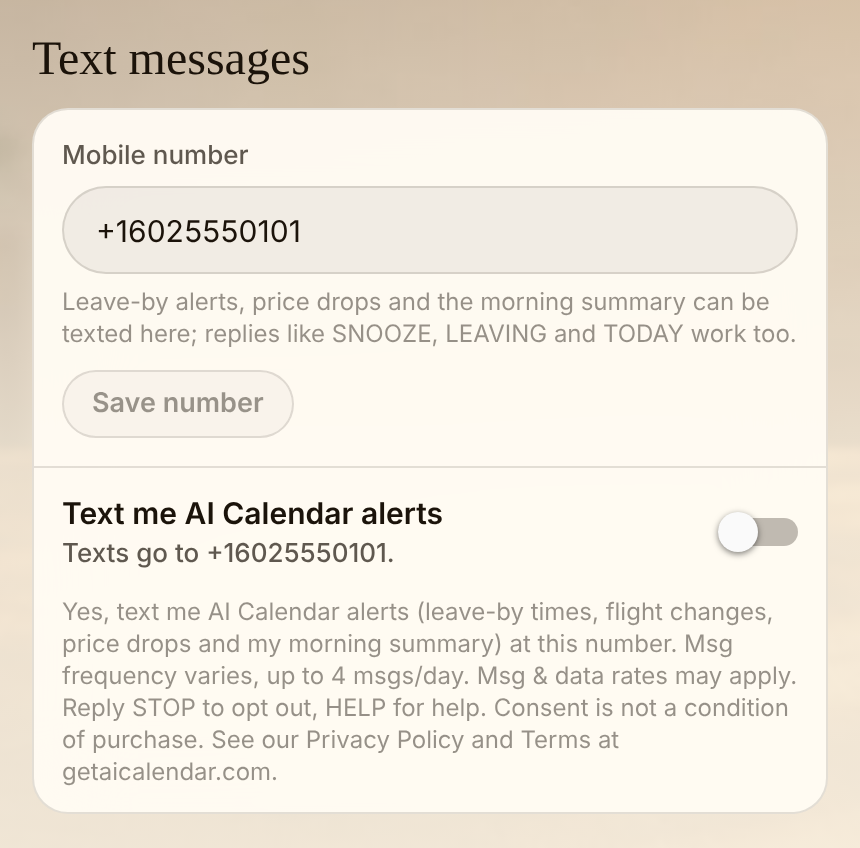
- Under Text messages, enter your mobile number and tap Save number.
- Turn on Text me AI Calendar alerts. It is off by default, and only you can turn it on for your own number. Beside the switch it says:
“Yes, text me AI Calendar alerts (leave-by times, flight changes, price drops and my morning summary) at this number. Msg frequency varies, up to 4 msgs/day. Msg & data rates may apply. Reply STOP to opt out, HELP for help. Consent is not a condition of purchase. See our Privacy Policy and Terms at getaicalendar.com.” - We record when you agreed and which wording you saw, and send this confirmation: “AI Calendar: You’re signed up for calendar alert texts. Msg frequency varies, up to 4 msgs/day. Msg & data rates may apply. Reply HELP for help, STOP to opt out.”
Text alerts may be offered as a paid add-on to your plan. Opting in is optional and is not required to use AI Calendar.
How often
Message frequency varies with your calendar, up to 4 messages a day. Verification codes are sent only when you ask for one.
Stopping and help
Reply STOP to any text to stop all texts, or turn off Text me AI Calendar alerts in your profile. Reply HELP for help, or email support@getaicalendar.com. Message and data rates may apply. Carriers are not liable for delayed or undelivered messages.
Your number
No mobile information will be shared with third parties or affiliates for marketing or promotional purposes. Text messaging opt-in data and consent are not shared with any third party. Your number is shared only with our SMS provider (Twilio) to deliver the messages. See the privacy policy and terms.