Get AI Calendar on your phone.
Free to download. Snap an invite, forward an email, and see the whole family's week wherever you are.
Start free on the web

Same account on your phone and on the web.
The whole app in 90 seconds.
Type it, snap it or forward it, and watch it land on the right person's calendar. Then trips, fare drops, shared costs, invites and your own AI assistant, in one quick tour.

You shouldn't have to be the family's memory.
Every week the plans show up in a different place: a school email, a group text, a photo of a flyer, a booking in someone else's inbox. Then one person ends up keeping it all straight.
- EmailOrthodontist moved to Tuesday, 1:30
- TextCan someone grab Audrey after practice?
- PhotoThe wedding invite on the fridge
- InboxOwen's flight home, booked by Owen
AI Calendar keeps track, so you don't have to.
Drop in anything. It becomes a card you approve.
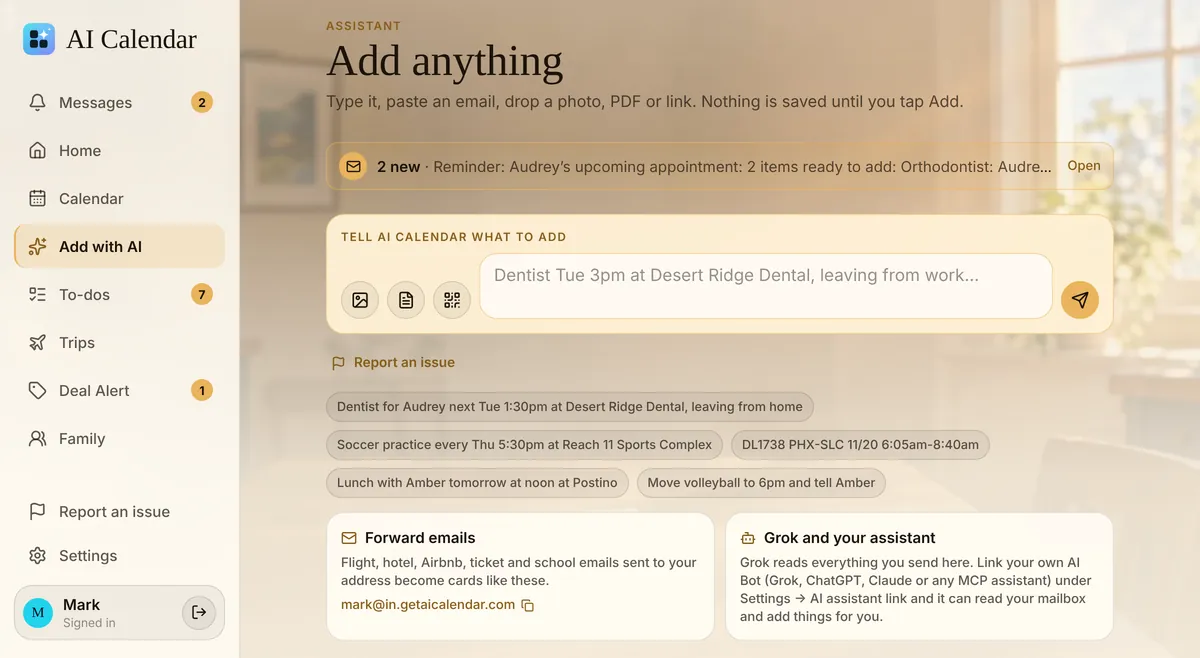
Forward an email to your private address, snap a wedding invitation or a practice schedule, paste a link or a PDF, or just type "Dinner at 5 at Tony's tomorrow." The AI turns it into events, trips and to-dos, picks who should see them, and waits for your okay.
Your trip confirmation: Phoenix to Tampa
- Flight
- DL1738 / DL2271 · Tue 6:05 am
- Hotel
- Tampa Marriott Water Street
- Car
- National · pickup 5:00 pm
- Code
- HP2QZR
Hold the button, or hold Space while it's focused
Three cards landed on the week, with the confirmation code attached. Nothing saves until you tap Add.
It knows who it's for
The orthodontist reminder lands on Audrey, Amber can edit it, and the boys just see "Busy." That's how the family set it up.
Nothing lands without you
Every card waits on Today for Add or Skip, and anything the AI changes can be undone from Activity.
Booking emails are free
Paid plans read 100 imports a month. Calendar invites and most airline, hotel and ticket emails never count.
Every calendar the family already uses, in one place.
Link Google and Outlook once and they stay in sync both ways. Any app that offers a calendar link (.ics or webcal) comes in automatically and keeps itself up to date: sports teams, schools, clubs and more.
Google and Outlook
Sign in once. Changes made in either place show up in both.
- Google Calendar
- Outlook.com
- Microsoft 365
- Work calendars (as Busy only, if you like)
Team schedules
Paste the team's calendar link. New games, practices and time changes arrive on their own.
- TeamSnap
- SportsEngine
- GameChanger
- LeagueApps
- TeamSideline
- PlayMetrics
- Spond
- Heja
- BAND
School and everything else
District and classroom calendars, college schedules, clubs, churches and holidays.
- School district calendars
- Canvas
- Schoology
- ParentSquare
- iCloud shared calendars
- Yahoo Calendar
- iPhone & Android calendars
In the team app, look for “Export”, “Sync to calendar” or “Subscribe”, copy the link, then paste it in AI Calendar under Settings → Calendars and email → Add a calendar.
The rest of the week, handled.
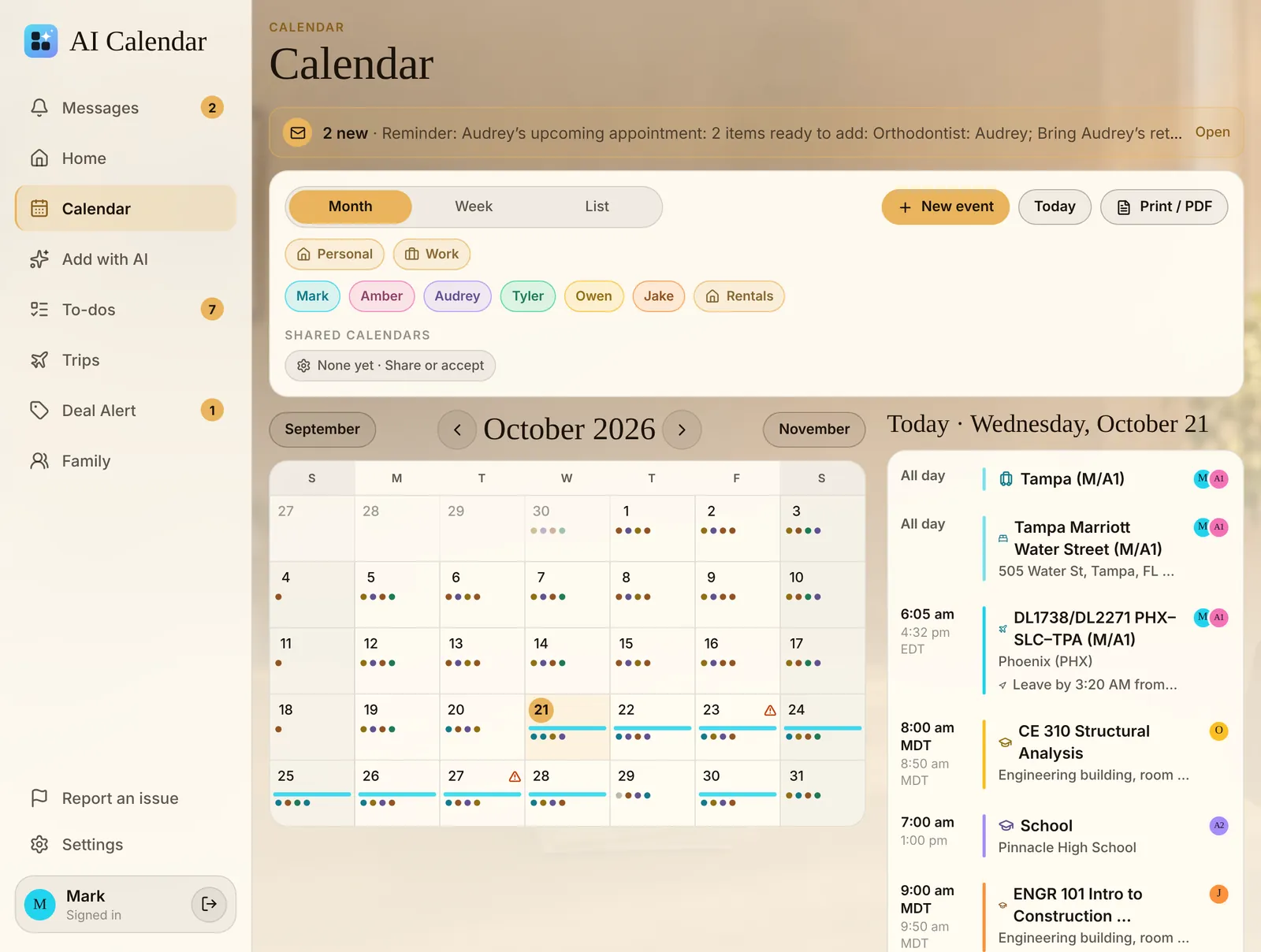
A high-schooler with a 7 a.m. start and a 3 p.m. shift, three in college in two states, the rental cabin, and the parents' work calendars. All on one screen.

01Leave-by times
Every appointment gets a leave-by time from home or work, re-figured as traffic changes. How leave-by times work.
02One message center
Traffic alerts, price drops and the morning summary at the top of every screen, and as phone notifications.
03Who sees what
Sharing groups decide who sees an event. Work calendars can come in as "Busy" only.
04Kids away at college
A student in Fort Collins keeps their own time zone and class schedule, and still counts as household.
05To-dos beside events
The retainer for the orthodontist, the car back by noon, the form due Friday, right next to what they belong to.
06The morning summary
Who is where, what leaves when, what's due, and anything the AI added overnight for you to approve.
07A rentals calendar
Cabin or condo bookings on their own calendar, so a turnover never collides with your weekend there.
08A booking page
A coach, a client or the babysitter can pick a time with you, inside the hours you allow.
09Same calendar everywhere
Phone, tablet and web, with your phone's own calendar kept in sync if you want it.

Every confirmation number in one place.
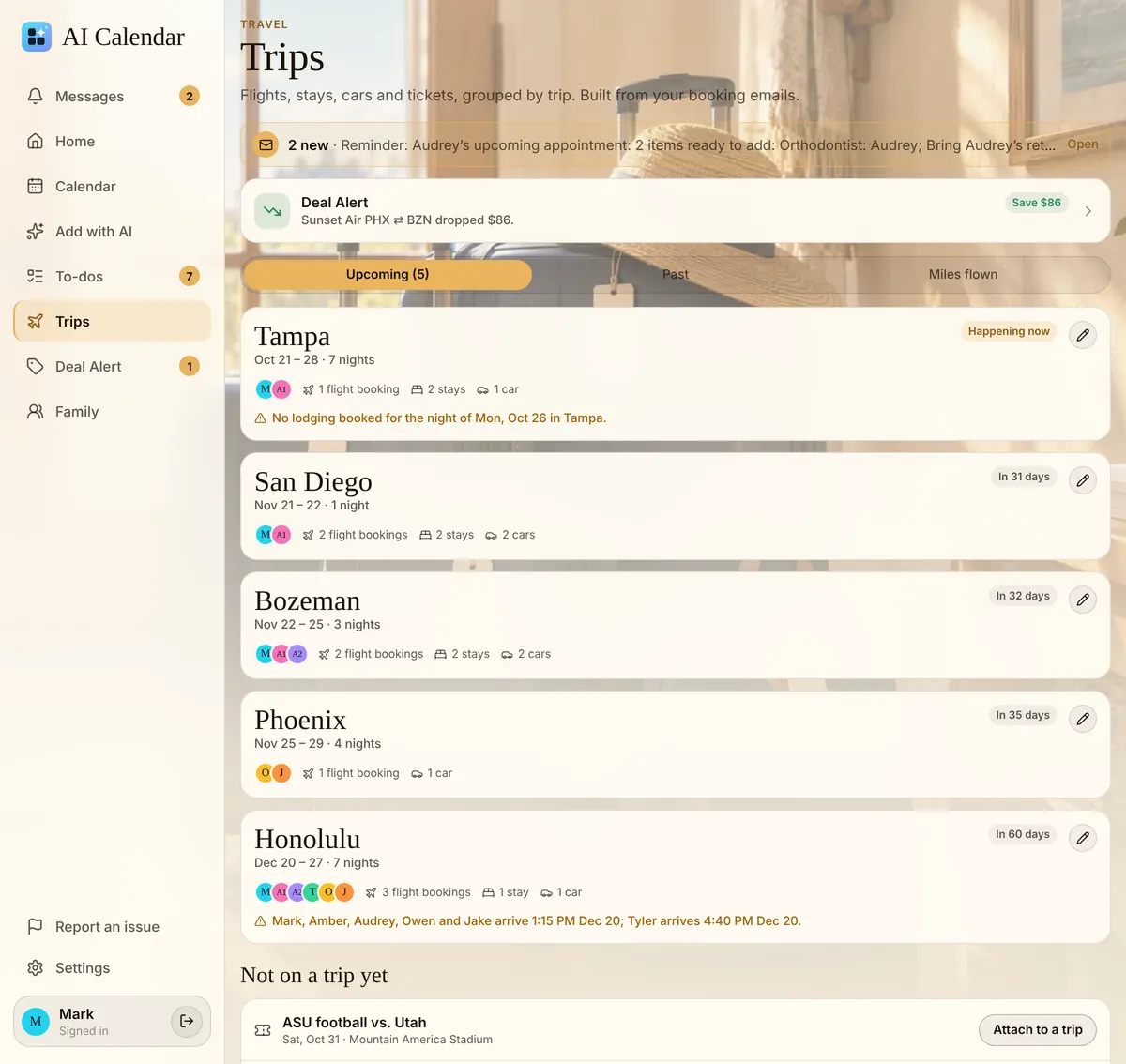
Flights, hotels, cars and tickets group into trips on their own, with the codes, check-in windows and who is driving. Pull up HP2QZR at the gate without digging through email.
Everyone's flights to the same place
Parents flying from Phoenix, Tyler on his own flight, two more from Denver, three airlines. One trip, one list.
Pickup, return, driver, deposit
Cars and hotels show their windows, who is driving, and whether they're paid, pay-at-pickup or refundable.
Tickets, weddings and the game
Section and row, the dinner reservation, the ceremony time, on the calendar for whoever is going.
Booked it already? It still watches the price.
Most airline fares can be rebooked for a credit when they drop, pay-at-pickup cars can be rebooked for free, and refundable rooms can be rebooked at the new rate. When a drop is worth it, it tells you exactly what to do.
- You paid
- $1,264.80
- Fare now
- $1,178.40
- Back to you
- $86
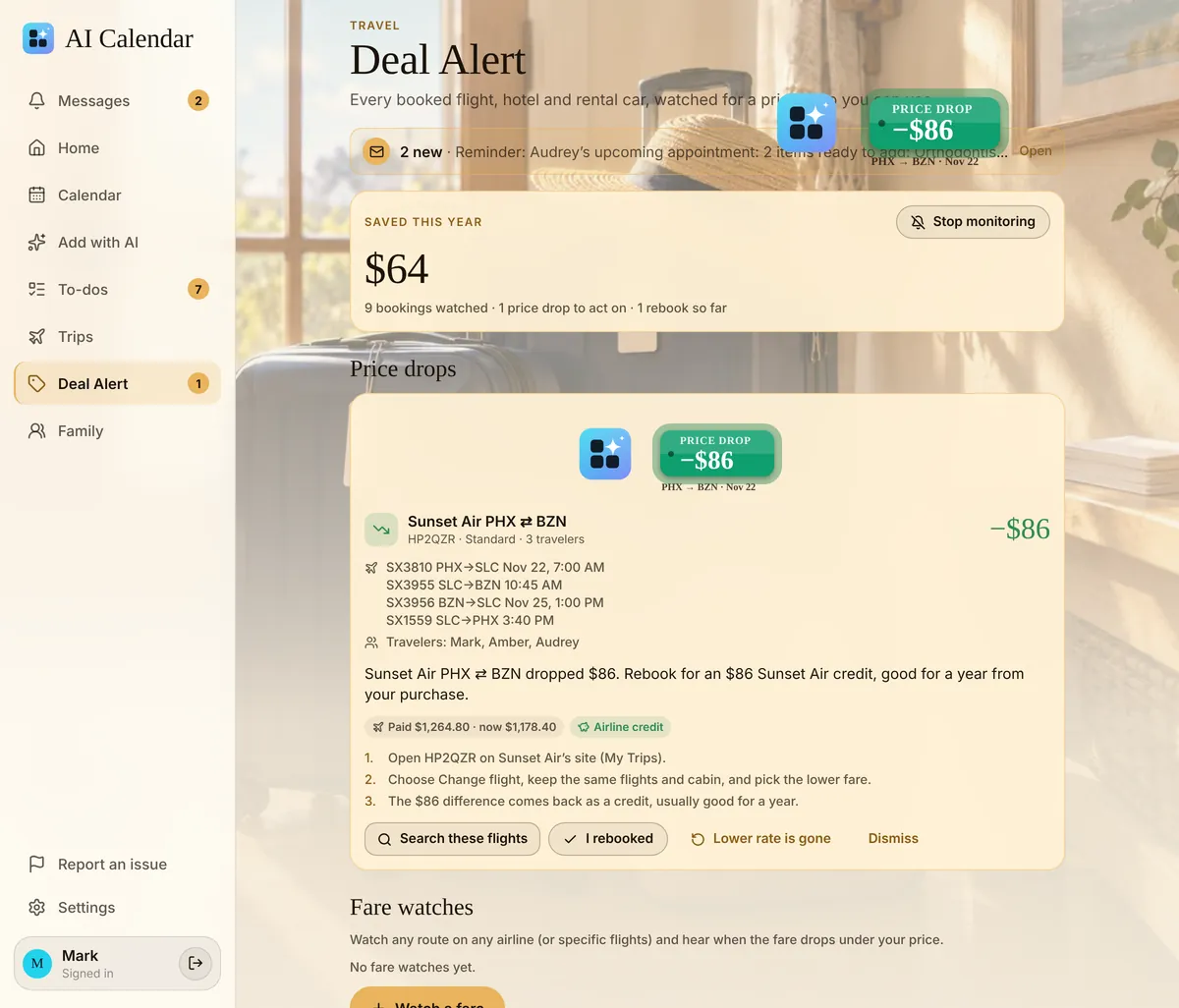
- Open HP2QZR on the airline's site and choose Change flight.
- Keep the same flights and cabin, and take the lower fare.
- Mark it rebooked. The $86 goes on your running total for the year.
Even better with your own AI assistant.
On its own, AI Calendar reads what you forward to it. With a paid plan you can link your own AI assistant (Claude, ChatGPT, Gemini, Grok or another AI tool). It can find confirmations in your mailbox, answer questions about the week, move things by voice or chat, and watch for conflicts. Every change shows up in Activity, with undo.
You decide the scope: read-only or read-and-add keys, revoked any time. Works with Claude, ChatGPT, Gemini, Grok and any AI tool that supports MCP. No assistant? Email rules for Gmail, Outlook, Microsoft 365 and Hotmail forward only your booking emails.
Reads confirmations and schedules from
Free to start. One rebooked fare usually covers it.
No card needed to start. Household covers up to 6 people, at home or away at college, and $1.49 a month for each person beyond that. Prices are per month; paying annually saves about 20%.
Your own calendar, and a look at how the family version works.
- One person: calendar, trips, to-dos and booking confirmations
- Calendar invites and published calendar links
- 3 AI imports a month to try it; no Deal Alert (see it in the demo)
- The week ahead by email (weekly summary)
Save about 20% with annual billing ($119/year)
The whole family on one calendar, with the AI reading everyone's emails, photos and PDFs.
- Deal Alert on booked flights, hotels and cars (often paying for the annual membership in itself)
- AI imports to create calendar events (100/month per plan)
- Leave-by times with live traffic and the morning summary
- Up to 6 people, at home or away at college
- Sharing groups, admins and work calendars
- Daily schedule and weekly summary by email
- WhatsApp alerts for the family (texts from a prepaid pack, about 2¢ each)
Save about 20% with annual billing ($99/year)
Everything, for one person.
- Deal Alert on booked flights, hotels and cars (often paying for the annual membership in itself)
- AI imports to create calendar events (100/month per plan)
- Leave-by times with live traffic and the morning summary
- Every feature, for one person
- Daily schedule and weekly summary by email
- WhatsApp alerts (texts from a prepaid pack, about 2¢ each)
30-day money-back guarantee. Not happy in the first 30 days of a paid plan? Email support@getaicalendar.com and we'll refund your payment in full.
Fair questions, straight answers.
Yes. It reads Google Calendar, Outlook, Microsoft 365, iPhone and Android calendars, and any calendar link (.ics or webcal) from school, teams and clubs, such as TeamSnap, SportsEngine, GameChanger, LeagueApps or a school district calendar. On an iPhone, AI Calendar can also put your family calendar straight into Apple’s Calendar app through iCloud.
Yes. In the AI Calendar iPhone app, go to Settings → Calendars → Show AI Calendar in the iPhone’s Calendar app and tap Turn on. It adds a calendar named “AI Calendar” to your iCloud account, so the family’s events show in Apple’s Calendar app on your iPhone, iPad, Mac and Apple Watch, with no Google account in between. Make changes in AI Calendar; your Apple devices follow within moments of opening the app. On a computer, you can instead subscribe to your private calendar link (Settings → Calendars). AI Calendar can also read the calendars already on your iPhone, like a work calendar.
Start free and decide later. Deal Alert and the AI imports are part of the paid plans: Individual is $10.49 a month for one person, Household $12.49 a month for up to six, and paying annually saves about 20%. Deal Alert keeps a running total of what it saved you, right next to the plan's price, and one rebooked fare usually covers the year.
No. Everything it reads becomes a card on Today that waits for Add or Skip. Anything it changes can be undone from Activity.
You decide with sharing groups: parents, kids, school, work, rentals. Work calendars can come in as "Busy" only, so the family sees you're booked without seeing the meeting.
They don't have to do much. Their school and practice schedules come in on their own, leave-by alerts reach their phones as notifications, and college kids keep their own time zone and class schedule.
No. Forwarding emails and snapping photos works on its own. Linking an assistant is optional and comes with the Individual and Household plans (not Free); it works with Claude, ChatGPT, Gemini, Grok or any AI tool that supports MCP. You can also set up an email rule in Gmail, Outlook, Microsoft 365 or Hotmail that forwards only booking emails.
Yes. WhatsApp is included on the paid plans (up to 500 messages a month for a Household, 300 for an Individual). Texts come in packs on any plan, Free included: 250 for $5.49 up to 2,500 for $49.49, about 2¢ a text, and they never expire. A long message uses up to 4 texts. Each person picks one. It sends the morning schedule, Deal Alert price drops and traffic changes to a leave-by time; WhatsApp also gets the week ahead. You must be 18 or older to get WhatsApp messages.
Every paid plan comes with a 30-day money-back guarantee. If you aren't happy in the first 30 days, email support@getaicalendar.com and we refund your payment in full. You can also cancel any time in Settings; the plan stays on until the end of the period you paid for.
AI Calendar is developed, owned and operated in the USA by ACED AI Solutions Company in Polson, Montana. The website runs on servers in Phoenix, Arizona, and your calendar, sign-in and files are stored in North America (Montreal, Canada) with Supabase. We don’t sell your information, and the AI services that read your imports aren’t allowed to train on it. Details: privacy.
See it with a real week.
The demo family has school, three college schedules, a Hawaii trip from two airports, a wedding, a concert and a game, all this month. No account needed.
Developed, owned and operated in the USA · hosted in North America