Flyer to calendar: snap it, check the cards, and the family sees it
The flyer comes home in a backpack. Someone photographs it, someone else asks when the thing is. AI Calendar reads the photo, turns every date on it into a calendar card, and puts the cards on the family calendar once you approve them.
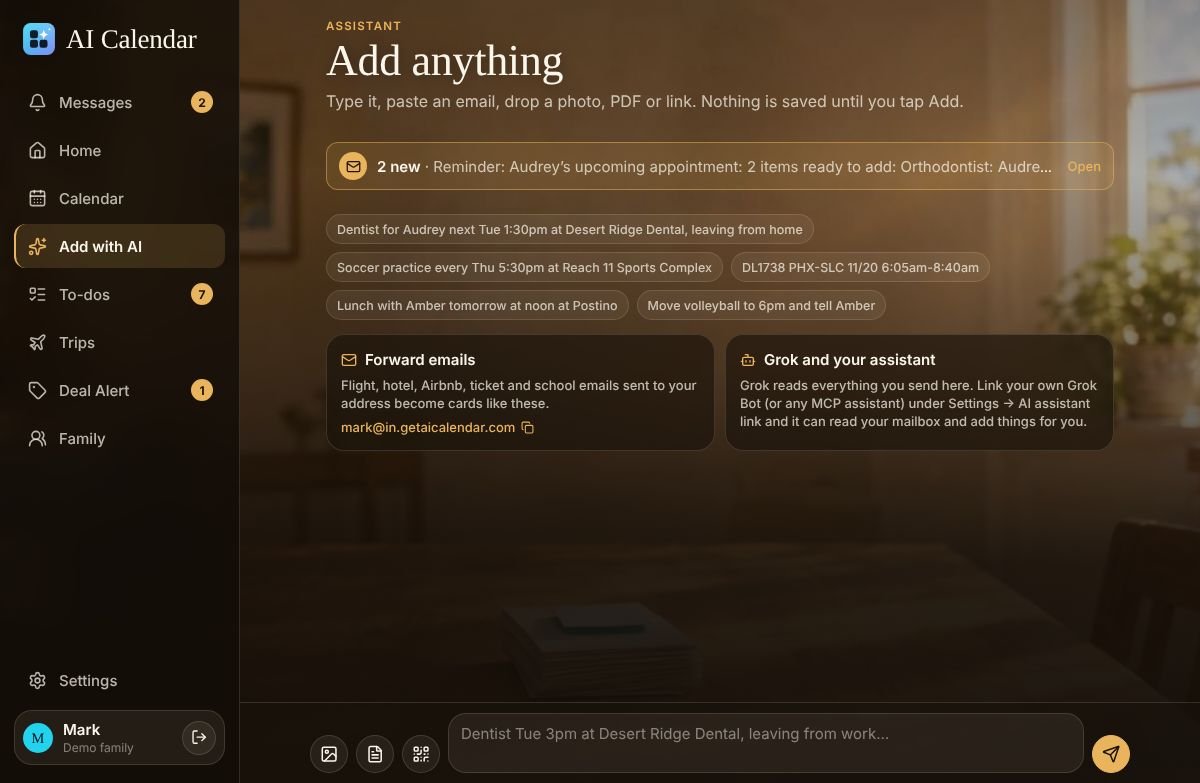
The ten-second version
- Snap the flyer in the phone app, or on the web open the QR code and take the photo with your phone; the upload page needs no sign-in, so it works from any phone in the house.
- Check the cards. The AI reads the photo and shows one card per event: title, date, time, place, and who it is for. Dates without a year or a time are flagged so you can fix them.
- Tap Add. Nothing is saved until you do. Anything the AI added can be undone from Activity.
Whose calendar it goes on
A parent adding the swim-team flyer does not want it on their own calendar. When more than one family member could own the events, a “Whose calendar?” chooser appears above the cards. Pick the kid, and the events land on their calendar with the right sharing: the parents can edit, siblings see “Busy”, the way the household set it up.
What the AI reads from a photo
- Dates in any of the usual forms, including “next Thursday” and “every Tuesday through March”.
- Times, including a bare “at 6”, which it reads as 6 p.m.
- Places, matched against Google Places so the event has a real address and gets a leave-by time.
- Repeating schedules, which become a series rather than twelve separate events.
A photo counts as one AI import; the paid plans include 100 a month, which is a lot of flyers. Booking confirmations with exact markup (airlines, hotels, OpenTable, Ticketmaster) are read without AI and never count.
Compared with phone-only scanners and the built-in options
| Option | What you get | Who sees it |
|---|---|---|
| “Photo to calendar” apps on the App Store | Events added to the phone's own calendar | You, unless you also share the calendar by hand |
| Apple Visual Intelligence “Add to Calendar” | An event from a photo on iPhone 16 or later, saved to Apple Calendar (per Tom's Guide, November 2025) | You |
| AI Calendar | Cards you approve, on any family member's calendar, from any phone or the web | The household, by sharing group; with a leave-by time and the trip or to-do that goes with it |
Competitor details were read on October 14, 2026.
Try it on the demo family’s flyers
The demo family has school, three college schedules, a Hawaii trip from two airports, a wedding, a concert and a game, all this month. No account needed.
Questions people ask
- Does the flyer need to be a good photo?
- It needs to be readable. A phone photo of a flyer on the fridge is fine; a blurry one gets a card that says what could not be read, so you can retake it.
- Can I forward a PDF instead?
- Yes. Forward the email with the PDF to your family’s private address, paste a link, or attach the PDF on the Add screen. Every route ends in the same cards.